
- Inside online banking, navigate to the OG Pay settings page:
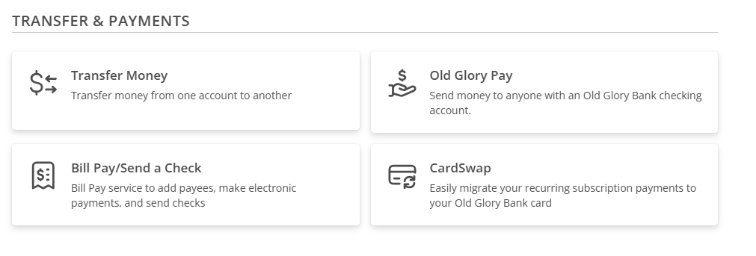
- Select Transfers & Payments from the navigation menu
- Click on the OG Pay tile
- Old Glory Pay Transactions are also listed in your account’s transaction history if the account was used to send or receive funds.
- What should I do if I don't recognize an OGPay payment within my account?
- Navigate to your Old Glory Pay transaction history and review the OG Pay transaction details.
- Click on the Transfers & Payments menu option, then selecting the Old Glory Pay tile.
- Locate the OG Pay transaction and click on it to open the transaction’s details.
- If you do not recognize the sender, or find a transaction that you did not send, please contact our Customer Service team as soon as possible.
Will these payments appear in my regular bank account transaction history too?
- Yes, you can see OG Pay transactions in your account history if the account was used in the OG Pay transaction. If you received money through an OG Pay transaction, you will see this transaction listed in your designated Receiving Account. If you sent funds through an OG Pay transaction, you will see this transaction listed in the account history for the account you selected as the From Account during the transaction process.
- OG Pay transactions are listed as ‘OG Pay Transfer – (Note)’, with up to 16 characters of the optional note included in the transaction. For more details about the OG Pay transaction, tap the Transfers & Payments menu option, then select the Old Glory Pay tile. Locate the transaction in your Old Glory Pay transaction history, and click on it for more details.