
Adding a memo or comment to your Bill Pay check creates clarity and helps you track exactly where your money is going.
To add a memo or comment:
-
From the Main Menu or via Transfers & Payments, go to Bill Pay.
-
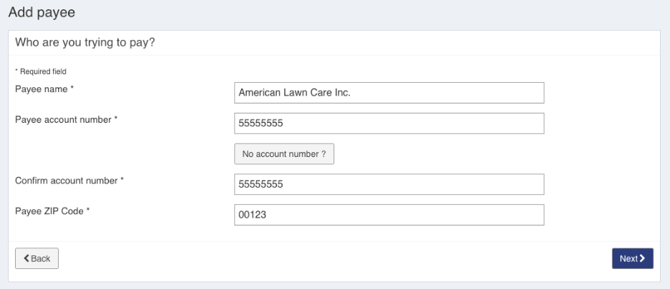
Choose or add a recipient.
-
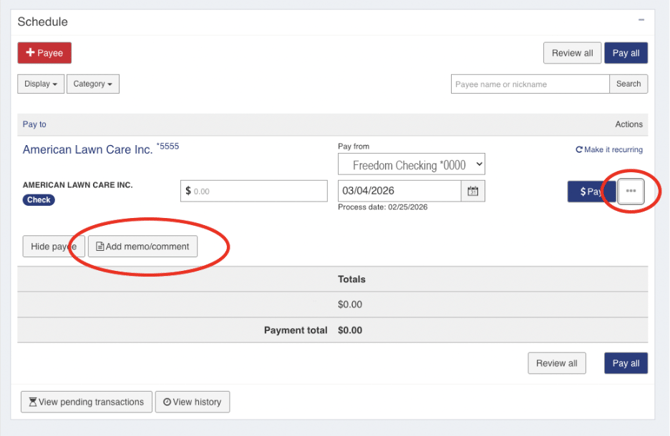
Click on the three dots to the right of the “$Pay” button.
-
On the left below the addressee information, click on “Add memo/comment”.
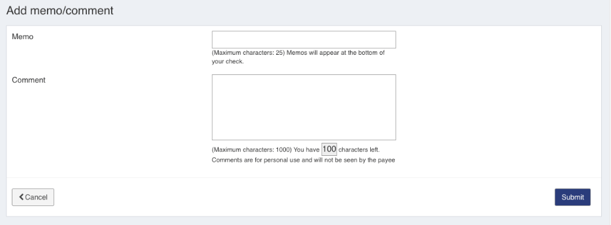
- Add text to the Memo field if you would like text printed on the check’s MEMO line.
- Add text to the Comment field if you would like to add an internal note to the transaction
- Click Submit.
How do I pay bills using Bill Pay/Send a Check?