
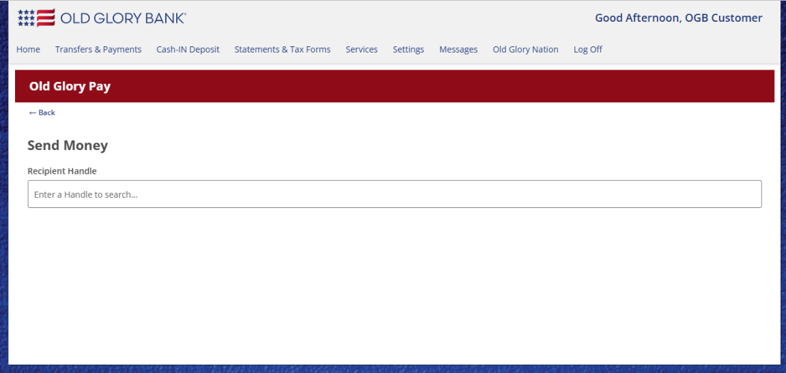
You cannot search for a customer’s name to locate a handle. You must enter their exact handle name to initiate a transfer with the recipient.
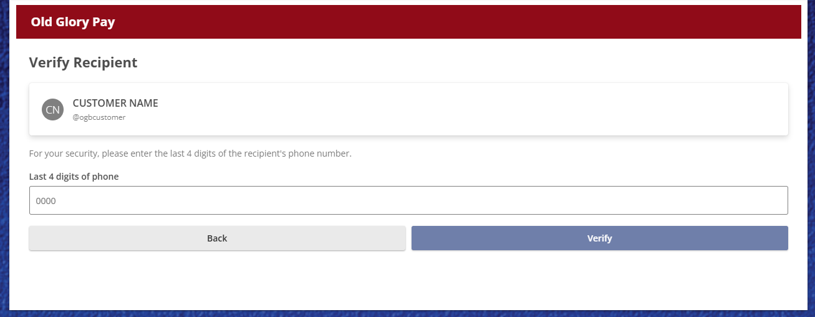
If this is your first time sending money to this recipient, you’ll need to confirm the recipient’s name and verify the last 4 digits of the phone number associated with their OGB account. Then click Verify.
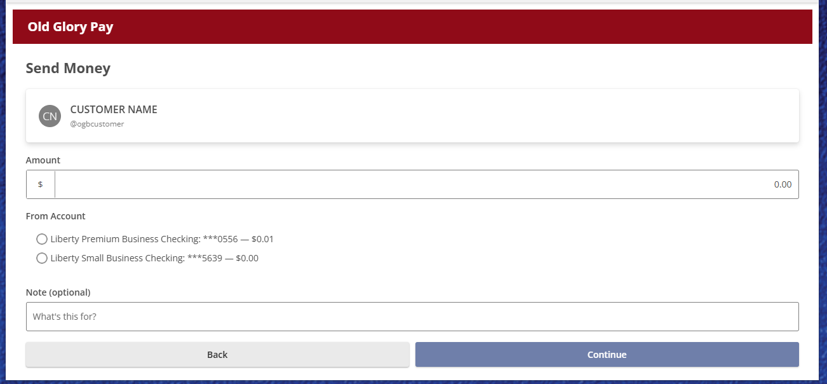
After confirming you have selected the correct recipient, enter the amount you intend to send and select the checking account you’d like to send from.
-
You can add an optional note that will be included with the transaction details.
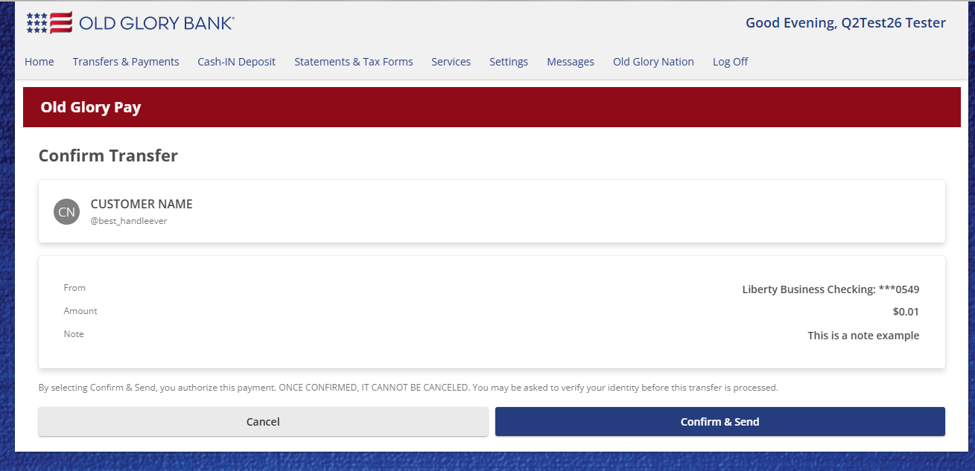
Click Confirm and Send to process your payment. You may be asked to enter a secure access code before the payment is sent.
-
Always make sure you are sending money to someone you trust.
-
BE AWARE THAT OGPAY TRANSFERS SETTLE INSTANTLY AND CANNOT BE REVERSED.
Does the recipient of the funds also need to enroll in OGPay and create a handle in order to receive funds?
- Yes, to receive funds using OGPay, the recipient must first enroll in OGPay and create a unique handle associated with their preferred Receiving Account.
Will I see the recipient's name before confirming payment?
- Yes. Before you confirm and submit your payment, the payment screen will display the recipient’s name so you can verify you are sending funds to the correct person. For personal accounts, you will see the recipient’s full name. If you are sending funds to a business account, the registered business name will be displayed instead. This added verification helps ensure you can review the recipient details before completing the transaction.
- At this time, recurring payments are not available through OG Pay. Each payment must be initiated individually when you are ready to send funds. We understand that the ability to schedule and automate recurring payments would be a valuable feature, and it is on our list of future enhancements that we hope to add as OG Pay continues to evolve.
- No. There is no minimum amount required to send money using OG Pay, so you can send any amount that falls within your available balance and transaction limits. However, there is a maximum amount you can send. Your specific transaction limits are available on the Old Glory Pay settings page, where you can review the sending limits that apply to your account.
Can I set up recurring payments?
- At this time, recurring payments are not available through OG Pay. Each payment must be initiated individually when you are ready to send funds. We understand that the ability to schedule and automate recurring payments would be a valuable feature, and it is on our list of future enhancements that we hope to add as OG Pay continues to evolve.
Is there a minimum amount I must send?
- No. There is no minimum amount required to send money using OG Pay, so you can send any amount that falls within your available balance and transaction limits. However, there is a maximum amount you can send. Your specific transaction limits are available on the Old Glory Pay settings page, where you can review the sending limits that apply to your account.
What happens if the receiving account is closed or not eligible to receive payments?
- OG Pay prevents payments from being sent to accounts that are unable to receive funds. If a receiving account is closed or is not eligible to accept OG Pay payments, the transaction will not be allowed to proceed. This safeguard helps ensure funds are only sent to valid, eligible accounts and reduces the risk of payment errors or failed transactions.
Are transactions processed in real-time, including weekends and holidays?
-
Typically, OG Pay transactions are processed in near real time, except for maintenance windows.